Using your own router/firewall with Optimum/SuddenLink (bridge mode and how to disable Wi-Fi)
-
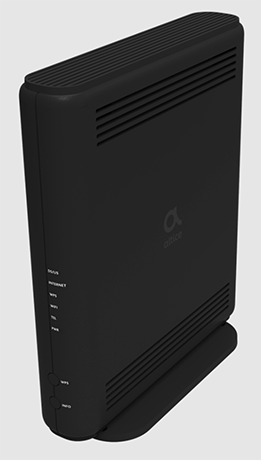
If you’re using your own router/firewall and noticed that the WAN address is something like 192.168.0.1 or 192.168.1.1, that’s because your modem/gateway has its own private network. You don’t want that if you’re using your own equipment, because the modem/gateway is NATing traffic and your router/firewall won’t be able to directly utilize port forwarding.Okay, no problem, so let’s just disable NAT through the modem/gateway’s interface. But… if you have a modem/gateway from Optimum/SuddenLink… you can’t access the web interface!
That’s not surprising. Their modems are poorly configured and according to support, cannot be directly accessed.
Optimum now supports changing your Wi-Fi network name and password through their website, but there’s no way to log into the interface directly, such as to http://192.168.254.1.
If you try to go to that address, it fails. Well, err, actually it does connect, but returns an HTTP status code 401 (Unauthorized). That means port 80 is open, and it is accepting traffic, but it won’t allow you to access it.

Error when connecting to Optimum modem interface.
If you go to http://192.168.254.1/login you’ll see yet another error.

Error when connecting to Optimum modem interface.
Here’s why…
From the factory, the device has a web interface and also supports telnet/SSH. After performing downstream/upstream ranging (where it’s actually scanning the frequency range for a connection), the Cable Modem Termination System (CMTS) works with DHCP to download a small configuration file (boot file) on your modem using a special DHCP option.
Apart from IP address assignment itself, DHCP is commonly used to set connection speeds and other DOCSIS configuration settings. That’s right… you Internet speed is controlled by your modem itself. The other special DHCP option that is commonly used is to set a TFTP server for firmware updates. Optimum disables the modem interface through either the DOCSIS config or through firmware using the DHCP special option.
Since Optimum is hell-bent on locking out ALL of the functions traditionally available on the modem, you won’t be able to access the modem interface after it obtains an IP address. Crap.
Using Your Own Router/Firewall
If you’re using your own router/firewall, and want to route traffic directly through the modem/gateway instead of having it NAT your traffic, you’ll need to enable bridge mode.
If you want to enable bridge mode on your modem, you will have to call their support and request it. They may tell you “you can do that on the website”, but they are mistaken. Only tech support can enable bridge mode, and it can be done. If you get someone who says otherwise, ask for Tier-2 support or a supervisor.
Disabling Wi-Fi on the Modem/Gateway
So you’ve got bridge mode enabled, but the modem’s Wi-Fi network is still broadcasting… hmm… so not true bridge mode then.
That’s okay, if you have your own wireless access point and don’t to use the built-in Wi-Fi functionality of the modem/gateway, here’s the trick:
- Press the Info button so the lights come on
- Hold down WPS and Info for 5 seconds
- Wait a minute or two
This works on many of their modems, including the Altice GR140D and Altice UBC1326.
The disablement should also persist across reboots.
